Full mix · free
Turn a whole song into MIDI, free.
Most audio to MIDI tools want one instrument at a time, so a finished song means separating it first, then converting each part, then lining it all up again.
TONIQ's Full mix engine does the whole job in one pass: it pulls the song apart into drums, bass, the vocal and the other instruments, and writes the notes of each, free and at any length: every part in one MIDI file, plus the audio stems. With Pro, each part leaves as its own MIDI track.
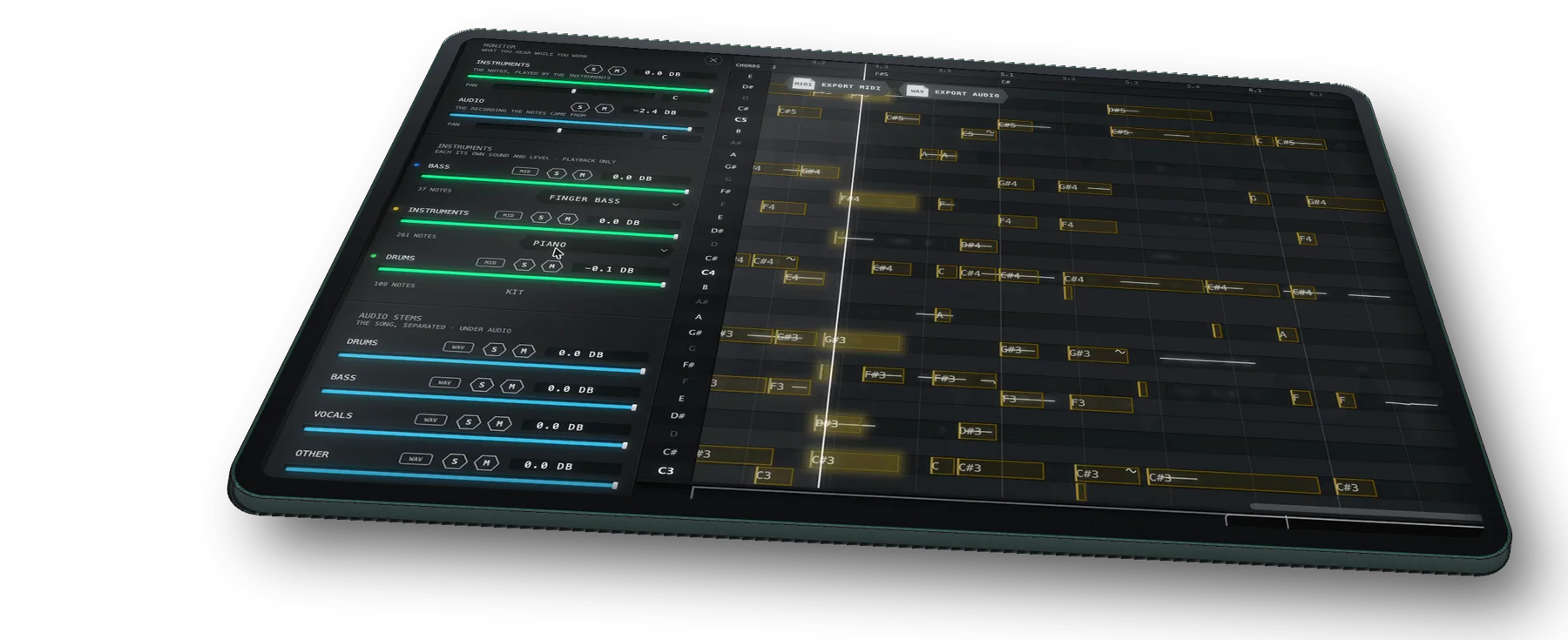
A song in, every part as MIDI out.
Each example is the finished recording, then the MIDI TONIQ wrote from it, every part played back on its own sound. Demo recordings generated with Google Flow Music.

Full mix: indie
A whole song, pads, plucked guitar and percussion → every part written out as MIDI (drums, bass and instruments), each played on its own sound.
What comes out.
Every part, written out
Drums as a drum part, the bass line, the chords and keys, and the vocal as a melody line, each on its own row. Free, they come out together as one MIDI file; with Pro, each part as its own MIDI track.
A mixer beside the notes
Every part plays on its own sound, with its own level, mute and solo, so you can hear each part's MIDI on its own before you take it out.
Chords stay chords
The instrument parts keep every voice of every chord, with velocity, not just the top line.
The audio stems too
The separated audio of each part drags out as a WAV, free. TONIQ Pro also edits the notes inside it.
From a song to MIDI.
-
1
Drop the song in
A WAV, MP3, AIFF or FLAC file onto the standalone app, or the song's clip on a track in your DAW. In an ARA 2 host TONIQ reads the clip itself.
-
2
Choose Full mix
TONIQ suggests it from the sound when it hears a band. It separates the parts first, then writes the notes of each.
-
3
Drag the MIDI out
All the parts in one MIDI file at your tempo, or, with Pro, each part onto its own MIDI track.
Setup for your DAW: ARA 2 or Capture. How accurate it is: measured on public test recordings.
Song to MIDI: questions.
Can you turn a whole song into MIDI? +
How can I convert a song to MIDI? +
Does it get the chords, or only the melody? +
Can I get the separated audio, not just MIDI? +
How accurate is it on a full mix? +
Can I use songs I do not own? +
Also: Vocal to MIDI · Drums to MIDI · MP3 to MIDI · Audio to MIDI in Logic Pro